 Polski





- 98% satisfied customers
- 72h delivery
- 30 dni na zwrot
Description
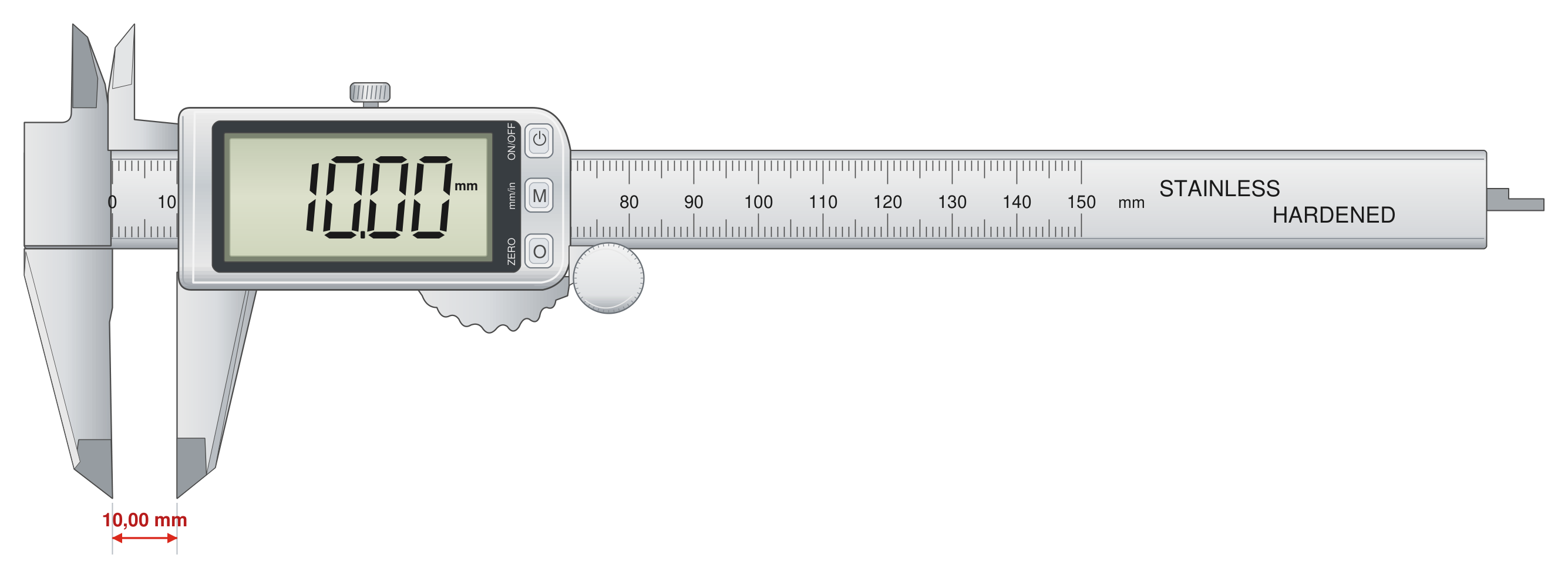
Electronic caliper 150 mm with large digits – technical data
Instrument range, resolution, accuracy, and included accessories
| Technical data | |
|---|---|
| Measuring range | 0–150 mm |
| Resolution | 0.01 mm |
| Accuracy | ±0.02 mm according to DIN 862 |
| Reading | LCD with enlarged digits |
| Units | mm / inch |
| Measurement types | external, internal, depth, step |
| Depth gauge | flat depth blade |
| Thumb roller | yes |
| Power supply | CR2032 3 V battery, 2 pcs included |
| Overall length | 240 mm |
| Material | hardened stainless steel |
0–150 mm
Measuring range
0.01 mm
Resolution
±0.02 mm
DIN 862 accuracy
2× CR2032
Batteries included
Electronic caliper 150 mm in the large-digit version solves the most common workstation problem: reading the result without leaning over the instrument. The enlarged LCD digits are clearly visible even at an angle and in dim shop lighting. One instrument takes four types of measurements: outside diameters, holes, depths, and steps.
The thumb roller lets you move the jaw with one thumb, smoothly and without jerking. Power is supplied by a CR2032 lithium battery rated at 3 V — a second battery is included in the package, so replacement does not interrupt work. The beam and jaws are made of hardened stainless steel.
Digital caliper construction – what makes the readout easy to read
Display, thumb roller, and locking screw on a single slider
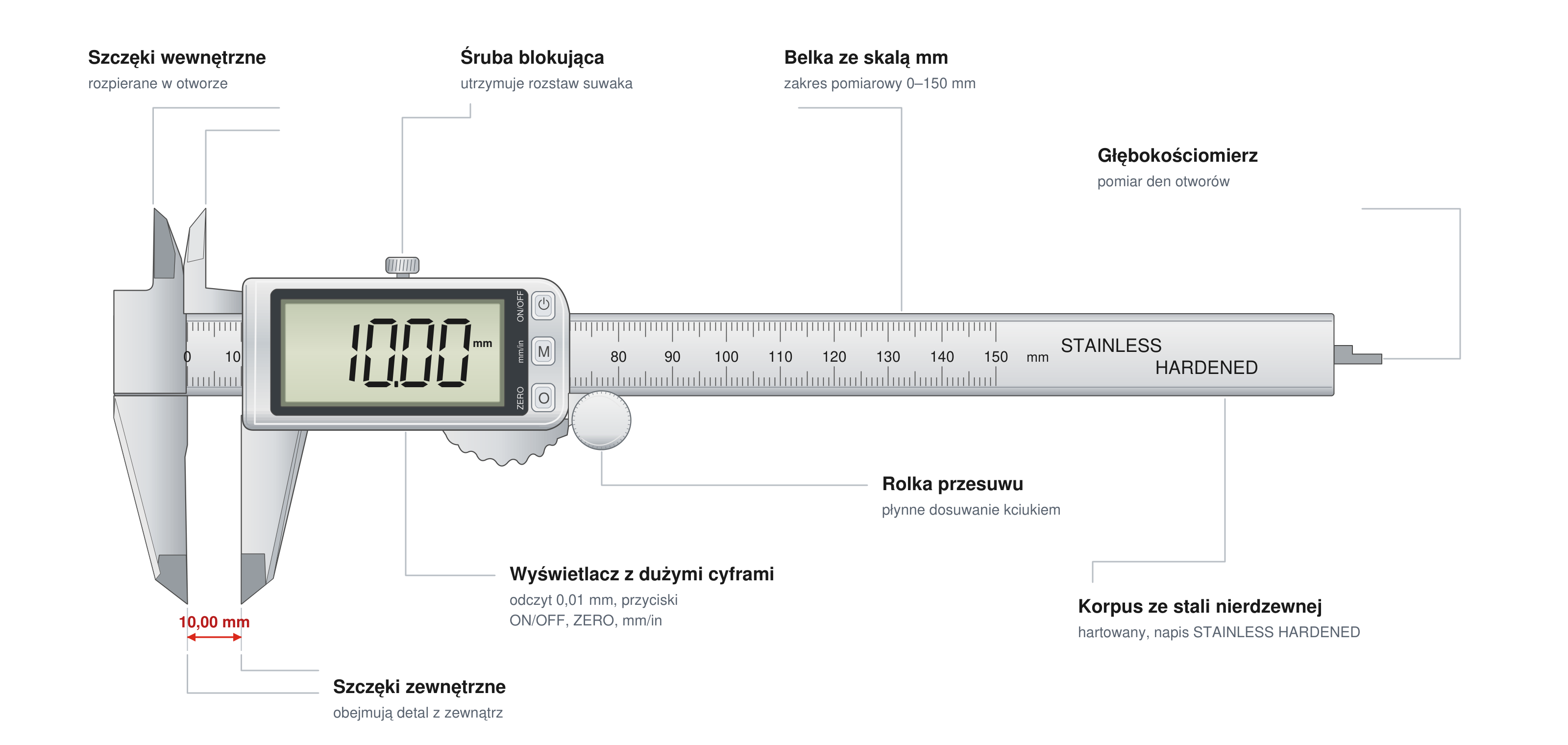
Typical digital caliper displays have digits 7–11 mm high — the large-digit version reaches the upper end of this range. This matters during batch inspection, when you glance at the result dozens of times per hour: less eye strain means fewer transcription errors. The locking screw holds the jaw spacing, for example when setting the instrument down to compare the dimension with a drawing.
Four measurements with a digital caliper – without changing instruments
Lower jaws, knife-edge upper jaws, and depth gauge blade
External dimension
Shafts, flat bars, screw heads — the lower jaws enclose the workpiece, and the result appears immediately on the display.
Internal dimension
Spread the knife-edge upper jaws inside the hole or groove; use the highest reading along the axis.
Depth
The flat depth blade reaches the bottom of the hole, while the end face of the beam rests on the edge.
Step
Measure the height difference between two surfaces using the end face of the beam and the depth blade.
ZERO function for batch inspection
Measure a reference standard and press ZERO — subsequent workpieces will be displayed as a positive or negative deviation. The large digits make a deviation such as −0.08 mm visible at a glance.
0.01 mm resolution versus ±0.02 mm accuracy according to DIN 862
What the standard actually guarantees and how to interpret the reading
A resolution of 0.01 mm is the smallest display increment, not a guarantee of agreement with the true value. Accuracy is specified by DIN 862: for the 0–150 mm range, the maximum permissible error is ±0.02 mm for external measurements and ±0.04 mm for internal or depth measurements. A reading of 25.37 mm therefore indicates a true value in the approximate range of 25.35–25.39 mm.
Converting mm to inches — without a calculator
The mm/in button divides the result by 25.4. Example: 12.70 mm ÷ 25.4 = exactly 0.500 inches; an increment of 0.01 mm corresponds to 0.0005 inches. For workpieces specified in inch-based drawings, this saves one conversion per measurement.
Application limitation
A caliper has no constant measuring force mechanism — closing the jaws too firmly bends them and produces an undersized reading. For tolerances below 0.05 mm, use a micrometer.
In everyday shop inspection a digital caliper with large digits speeds up each reading and reduces transcription errors. The 0–150 mm range covers most turned and milled parts, and four measurement types replace a set of separate instruments.
Caliper with large digits – frequently asked questions
The mechanics and accuracy are the same — the difference is the display. The enlarged LCD digits can be read from farther away and at an angle, speeding up batch inspection and reducing the risk of errors in poor lighting.
A CR2032 lithium battery rated at 3 V — two are included: one in the instrument and one spare in the package. Lithium cells have a flat discharge curve and typically last up to about 3 years in calipers, depending on usage intensity.
The roller lets you move the jaw against the workpiece with one thumb, smoothly and with control. Even, gentle pressure is essential for repeatable results — a caliper does not have the ratchet mechanism found on a micrometer.
No. 0.01 mm is the display resolution. Accuracy according to DIN 862 is ±0.02 mm for external measurements in the 0–150 mm range, and the last digit of the reading is approximate.
Reviews
No customer reviews for the moment.
Shipping
All orders are delivered by courier company GLS. For orders exceeding 369 PLN gross shipping is FREE
| Courier GLS | Przelew24 / Prepayment | 14,76 zł gross | Delivery time 1 working day |
| Courier GLS | Cash on delivery | 17,26 zł gross | Lead time 1 working day |
Recommended for you


This website uses its own and third-party cookies to improve our services and show you advertising related to your preferences by analyzing your browsing habits. To give your consent to its use, press the Accept button.
Cookie preferences
Functional cookiesTechnical
Functional cookies are strictly necessary to provide the services of the shop, as well as for its proper functioning, so it is not possible to refuse their use. They allow the user to browse through our website and use the different options or services that exist on it.
Advertising Cookies
These are cookies that collect information about the advertisements shown to users of the website. They can be anonymous, if they only collect information about the advertising spaces shown without identifying the user, or personalised, if they collect personal information about the user of the shop by a third party, for the personalisation of these advertising spaces.
Analytics cookies
Collect information about the user's browsing experience in the shop, usually anonymously, although sometimes they also allow the user to be uniquely and unequivocally identified in order to obtain reports on the user's interests in the products or services offered by the shop.