 Polski





- 98% satisfied customers
- 72h delivery
- 30 dni na zwrot

Dial test indicator Horizontal 0.8/0.01 mm
12695
€32.37 tax inc.
Net price: €26.32
Description
Horizontal dial indicator 0.8/0.01 mm – lever-type dial indicator
Technical data and dimensions
| Technical data | |
|---|---|
| Type | lever-type dial indicator, horizontal |
| Measuring range | 0.8 mm (±0.4 mm from zero) |
| Graduation | 0.01 mm |
| Dial | 0–40–0, 80 graduations per revolution |
| Measuring direction | bidirectional (+/−) |
| Zero setting | rotating outer bezel |
| Dial diameter d | 40 mm |
| Dial width A | 6 mm |
| Body depth B | 19 mm |
| Top of body – dial axis C | 17 mm |
| Dial axis – stylus pivot axis D | 47 mm |
| Dial axis – ball tip E | 61 mm |
| Body width F | 9 mm |
| Mounting | 3 positions |
| Included | case |
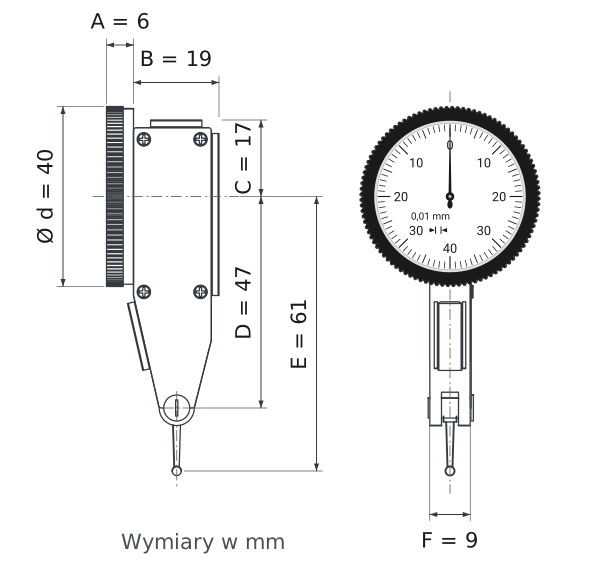
Horizontal dial indicator 0.8/0.01 mm is a lever-type dial indicator for comparative measurements. It does not measure a dimension directly – it shows how far a point deviates from the zero reference. One graduation on the dial represents 0.01 mm. The 0.8 mm range accommodates deviations of ±0.4 mm, for example when checking shaft runout or positioning a workpiece on a table.
The dial is 40 mm in diameter, and the body at the stylus is only 9 mm wide. This allows the indicator to fit where a standard dial indicator cannot.
Lever-type dial indicator construction
Pivoting stylus with a ball tip instead of a sliding spindle
RANGE0.8 mm (±0.4)
GRADUATION0.01 mm
DIALØ40 mm, 0–40–0
ZERO SETTINGrotating bezel
A standard dial indicator has a spindle that moves along its axis. The horizontal dial indicator has a measuring stylus with a ball tip. The stylus pivots through a small angle, and the gearing converts this movement into pointer rotation. This allows the ball tip to reach grooves, holes, and walls that a spindle could not reach.
The indicator measures in both directions from zero. You can therefore use the same dial indicator to check surfaces both above and below the reference. The rotating outer bezel sets zero at any pointer position. The body has 3 mounting positions, allowing the indicator to be set vertically, horizontally, or at an angle to the workpiece. After use, store it in its case, which protects the stylus and dial crystal from impact.
How to read the 0–40–0 dial
Graduations, numbers, and pointer direction
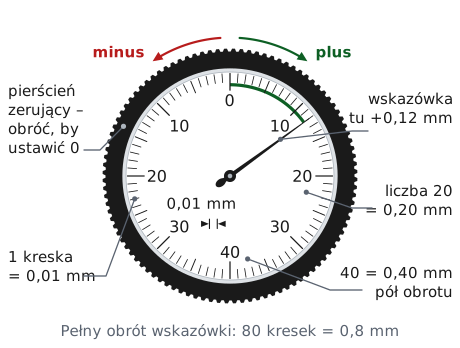
The dial has 80 graduations per full revolution. One graduation represents 0.01 mm, and a full revolution represents 0.8 mm, which is the indicator's entire range. The numbers 10, 20, 30, and 40 are spaced every 10 graduations, or every 0.10 mm.
Zero is at the top of the dial. A pointer to the right of zero indicates a positive reading: the stylus has deflected further than at zero setting. A pointer to the left indicates a negative reading: the stylus has moved back, and the point is lower. At the bottom, both scales meet at the number 40, representing 0.40 mm in either direction.
Reading the dial indicator in 4 steps
1Press
the ball tip against the reference or workpiece until the stylus deflects slightly
2Set zero
rotate the bezel until zero aligns with the pointer
3Move
the workpiece or indicator and watch which way the pointer moves
✓Count
graduations from zero × 0.01 mm; positive to the right, negative to the left
The numbers on the dial represent hundredths of a millimeter: 20 means 0.20 mm.
Three example readings
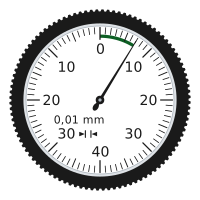
+0.07 mm
The pointer is 7 divisions to the right of zero: 7 × 0.01 mm = 0.07 mm. The stylus has deflected further than when zeroed, so the point is 0.07 mm higher.
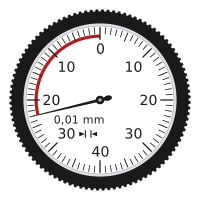
−0.23 mm
The pointer has passed the number 20 on the left and is 3 divisions beyond it: 0.20 + 0.03 = 0.23 mm. The left side is negative – the point is lower than the reference.
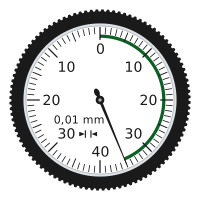
+0.35 mm
The pointer is 5 divisions past the number 30 on the right: 0.30 + 0.05 = 0.35 mm positive. Another 0.05 mm remains before the number 40, which represents half a revolution.
Example measurements with a bore gauge
Shaft runout, vise alignment, hole centering
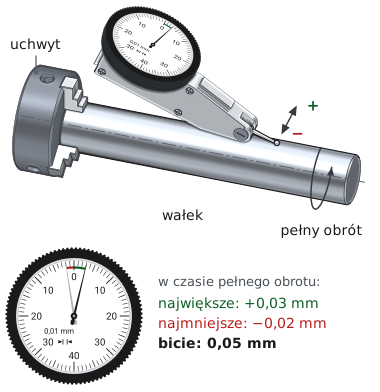
MEASUREMENT 01
Radial runout of a shaft in a lathe chuck
Place the ball tip against the top of the shaft and zero the indicator. Rotate the shaft by hand through a full revolution and note the maximum and minimum readings.
✓ Result: maximum reading +0.03 mm, minimum −0.02 mm. Runout = 0.03 − (−0.02) = 0.05 mm, the difference between the extreme readings over one revolution.
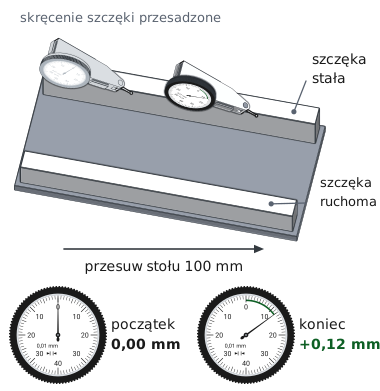
MEASUREMENT 02
Aligning a vise jaw on a milling machine
Place the ball tip against the fixed jaw at one end and zero the indicator. Move the table 100 mm along the jaw and read the dial.
✓ Result: a reading of +0.12 mm means the jaw deviates by 0.12 mm over a length of 100 mm. Rotate the vise until the readings at both ends are equal.
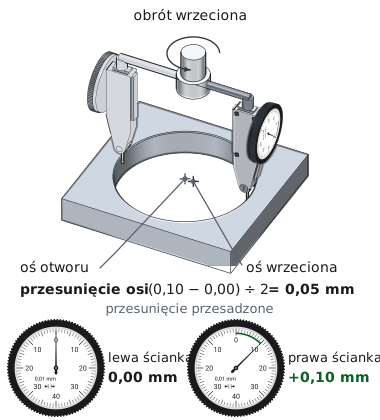
MEASUREMENT 03
Centering a hole relative to the spindle
Mount the indicator in the spindle and place the ball tip against the hole wall. Rotate the spindle by hand and read the dial on the left and right sides.
✓ Result: readings of 0.00 and +0.10 mm give an axis offset of (0.10 − 0.00) ÷ 2 = 0.05 mm. Move the table until the readings on both sides are equal; repeat for the other axis.
Stylus position and reading accuracy
Stylus angle, preload, range
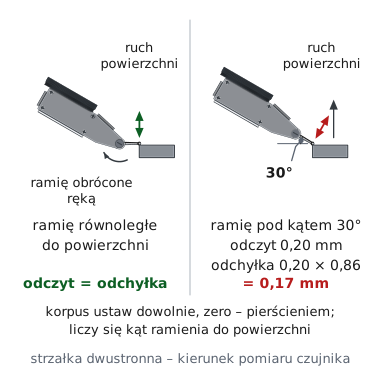
The bore gauge measures accurately when the stylus is nearly parallel to the measured surface. An angled stylus indicates more than the actual deviation. Calculate the correction by multiplying the reading by the factor for the stylus angle.
actual deviation = reading 0.20 mm × 0.86 = 0.17 mm
0.86 is the factor for a stylus inclined at 30° to the surface (the cosine of that angle). At 20° it is 0.94, and at 10° it is 0.98 – the error then drops to 2%. Therefore, position the stylus as close to parallel with the surface as possible.
The preload, or stylus deflection when zeroing, must exceed the expected negative deviation. For runout of around 0.05 mm, a deflection of approximately 0.10 mm, or 10 divisions, is sufficient. If the preload is too low, the ball tip will lose contact with the workpiece and the reading will be too low.
▲
Range of only 0.8 mm
The bore gauge compares deviations rather than measuring dimensions. One full revolution of the pointer covers the entire range – further pressure on the stylus may damage the gear mechanism. Move the workpiece in slowly, and move the ball tip away from the surface before repositioning the indicator.
Horizontal dial indicator 0.8/0.01 mm combines a graduation of 0.01 mm with a stylus that reaches into confined spaces. The 0–40–0 dial shows positive and negative deviations without scale conversion. It measures most reliably on a magnetic stand, with the stylus nearly parallel to the surface. After measuring, move the ball tip away from the workpiece and return the indicator to its case.
Questions about the bore gauge
Reading, zeroing, mounting
A dial indicator has a plunger that moves along its axis and typically a range of 10 mm. A bore gauge has a pivoting stylus with a ball tip and a range of 0.8 mm. The stylus reaches into grooves and holes, and the indicator shows deviations in both directions from zero.
Press the ball tip against a reference or workpiece until the stylus deflects slightly. Then rotate the outer bezel until zero is aligned with the pointer. From that point, the dial shows positive and negative deviations from this reference position.
Place the ball tip against the shaft, zero the indicator, and rotate the shaft through a full revolution. Runout is the difference between the maximum and minimum readings. Readings of +0.03 and −0.02 mm give a runout of 0.05 mm.
The body has 3 mounting positions, allowing the indicator to be positioned vertically, horizontally, or at an angle to the workpiece. It is most commonly held by an articulated magnetic stand placed on the machine table or a surface plate.
0.8 mm is the measuring range, corresponding to one full revolution of the pointer. 0.01 mm is the graduation – the value of one division on the dial. When zeroed at the midpoint of the range, the indicator shows deviations up to ±0.4 mm in increments of one hundredth of a millimeter.
Product accessories

Reviews
No customer reviews for the moment.
Shipping
All orders are delivered by courier company GLS. For orders exceeding 369 PLN gross shipping is FREE
| Courier GLS | Przelew24 / Prepayment | 14,76 zł gross | Delivery time 1 working day |
| Courier GLS | Cash on delivery | 17,26 zł gross | Lead time 1 working day |
Recommended for you


Viewed products

This website uses its own and third-party cookies to improve our services and show you advertising related to your preferences by analyzing your browsing habits. To give your consent to its use, press the Accept button.
Cookie preferences
Functional cookiesTechnical
Functional cookies are strictly necessary to provide the services of the shop, as well as for its proper functioning, so it is not possible to refuse their use. They allow the user to browse through our website and use the different options or services that exist on it.
Advertising Cookies
These are cookies that collect information about the advertisements shown to users of the website. They can be anonymous, if they only collect information about the advertising spaces shown without identifying the user, or personalised, if they collect personal information about the user of the shop by a third party, for the personalisation of these advertising spaces.
Analytics cookies
Collect information about the user's browsing experience in the shop, usually anonymously, although sometimes they also allow the user to be uniquely and unequivocally identified in order to obtain reports on the user's interests in the products or services offered by the shop.