





- 98% satisfied customers
- 72h delivery
- 30 dni na zwrot

Adjustable angle meter with 360-degree magnifier
0000004275
€67.97 tax inc.
Net price: €55.26
Description
360° adjustable bevel protractor with magnifier – technical data
Range, graduations, and measuring blades
| Technical data | |
|---|---|
| Type | Universal, with vernier |
| Measuring range | 0–360° |
| Main scale | 4 × 90°; graduation 1° |
| Reading resolution | 5′ ≈ 0.083° |
| Vernier | 0–60′ in both directions |
| Blade lengths | 300 / 200 / 150 / 70 mm |
| Reading aid | Magnifier over the vernier |

Adjustable angle meter with 360-degree magnifier is workshop bevel protractor for checking angles on workpieces and tools, as well as setups in the toolroom and workshop. Its design is that of a universal vernier bevel protractor, with an additional scale for reading angular minutes. The magnifier enlarges the reading area, and the clamp retains the setting after adjustment to the workpiece.
Universal vernier bevel protractor – construction and blades
The measuring range is 0–360°, but the main scale has four sections of 90° with 1° graduations. The vernier under the magnifier allows angular minutes to be read with a resolution of 5′. The scale layout means the reading must be interpreted according to the angle between the workpiece surfaces.
Components of the bevel protractor with magnifier
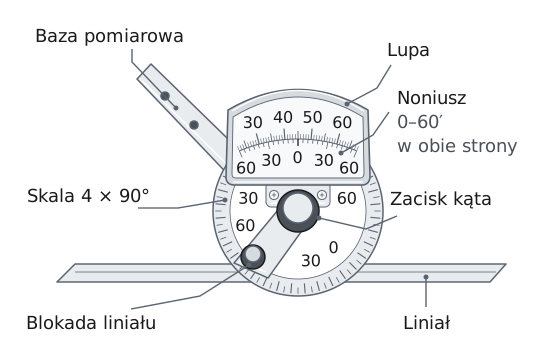
| ▸ | Measuring base – the fixed arm that rests against the workpiece reference surface. |
| ▸ | Blade – the movable arm placed against the second surface of the angle being measured. |
| ▸ | Blade lock – clamps the blade in its guide after the extension has been set. |
| ▸ | Angle clamp – locks the dial rotation and holds the set angle. |
| ▸ | 4 × 90° scale – the main dial scale in whole degrees, with 1° graduations. |
| ▸ | 0–60′ vernier – adds angular minutes in 5′ increments, in both directions from zero. |
| ▸ | Magnifier – enlarges the vernier and makes it easier to find the aligned graduation line. |
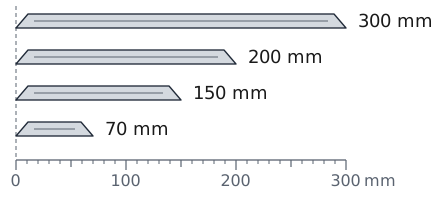
Four protractor blades: 300, 200, 150, and 70 mm
Four measuring blades with lengths of 300, 200, 150, and 70 mm make it easier to adapt the instrument to the workpiece size and available space. Choose a blade that spans the surface being measured without interfering with adjacent features. The sliding blade allows the required extension to be set.
Measuring an angle with an adjustable bevel protractor – step by step
1Clean the edges
Wipe the measuring surfaces of the instrument and workpiece with a soft cloth.
2Position the base
Place the measuring base on the workpiece reference surface.
3Adjust the blade and lock it
Move the blade against the second surface and check contact along its entire length. Maintaining contact, lock the angle and blade.
4Read through the magnifier
Look straight at the scale and read the degrees and minutes from the vernier.
Acute and obtuse angles – how to read the indication
01 / Acute angle
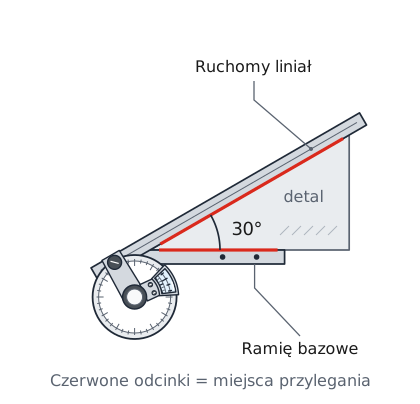
With this positioning, the acute angle is read directly: the 30° reading corresponds to the workpiece angle.
02 / Obtuse angle
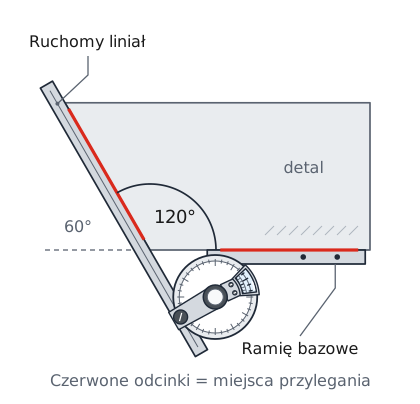
For the obtuse angle shown, subtract the 60° reading from 180° to obtain 120°.
For inspecting repeated workpieces, you can preset the angle. After locking the setting, place the instrument against the surfaces and check for a light gap.
Before taking a reading
Remove burrs and dirt from the contact surfaces. Lock the setting and look straight through the magnifier. Viewing at an angle can cause parallax error, an apparent shift of the scale graduation lines.
Angular vernier – reading degrees and minutes
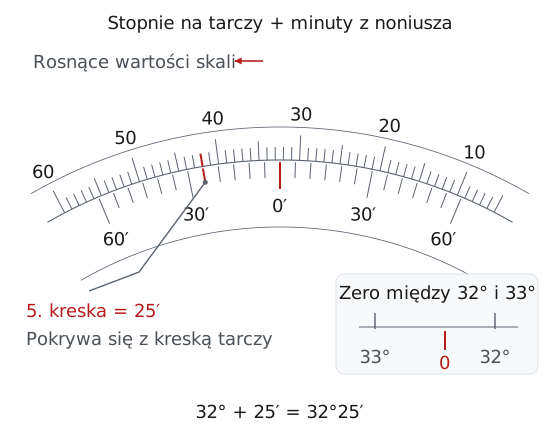
First read the whole degrees on the main scale at the vernier zero. Then find the vernier line that aligns with a dial line. Count from zero in the direction of increasing main scale values. Each successive graduation represents 5′, so the fifth line gives 25′.
The vernier has 12 divisions on each side of zero, from 0 to 60′, with labels every 30′. In the illustration, zero has passed 32°, and the aligned line indicates 25′. The result is 32°25′.
Reading in decimal degrees
25′ ÷ 60 ≈ 0.4167° → 32°25′ ≈ 32.42°
5′ ÷ 60 ≈ 0.0833°. Converting to decimal notation does not increase the instrument's resolution.
The 5′ resolution defines the reading increment, not the instrument's accuracy. The manufacturer does not specify the maximum permissible error for this model.
Workshop bevel protractor – workshop applications
In toolrooms and machine shops, a workshop bevel protractor is used to check angles, set fixtures, and perform layout work.
Drill point angle
A point angle of 118° means that each cutting edge forms an angle of 59° with the drill axis. Measure both edges: identical readings confirm symmetrical sharpening that does not produce an oversized hole.
Chamfer and taper
You can check a chamfer angle, e.g., 45°, on a workpiece edge and a taper angle on a journal or sleeve. Set the value from the drawing, lock the dial, and position the protractor: no light gap under the blade indicates a matching angle.
Setting a fixture at an angle
Set and lock the required angle, e.g., 30°. The protractor set this way serves as a reference for setting a vise, machining fixture, or milling head.
Scribing a line at an angle
Place the base against a straight edge of sheet metal or flat bar and guide the scriber along the blade. This marks a cutting line or a row of drilling points at the specified angle.
The 360° adjustable bevel protractor with magnifier combines a main scale with 1° graduations and a vernier read in 5′ increments. Four blades from 70 to 300 mm accommodate both a chamfer on a small workpiece and an angle along a long edge. The clamp holds the set angle, and the magnifier makes it easier to find the vernier line that aligns with the scale.
Vernier bevel protractor – questions and answers
The dial rotates through a full 360°, and the main scale has four sections of 90°. Readings are taken within the 0–90° range: an acute angle is read directly, while an obtuse angle is calculated as 180° minus the reading.
The reading changes in increments of 5 angular minutes, or approximately 0.083°. This is the vernier division; the manufacturer does not specify the maximum permissible error for this instrument.
Choose the side of the vernier that corresponds to increasing main scale values. The fifth line from zero indicates 25′ if it aligns with a dial line.
First identify the angle between the surfaces being measured. In the setup shown, the reading is 60°, and the workpiece angle is calculated as 180° − 60° = 120°.
The magnifier makes it easier to identify the vernier line that aligns with a main scale line. Look straight at the scale and take the reading after locking the setting.
Reviews
No customer reviews for the moment.
Shipping
All orders are delivered by courier company GLS. For orders exceeding 369 PLN gross shipping is FREE
| Courier GLS | Przelew24 / Prepayment | 14,76 zł gross | Delivery time 1 working day |
| Courier GLS | Cash on delivery | 17,26 zł gross | Lead time 1 working day |
Recommended for you
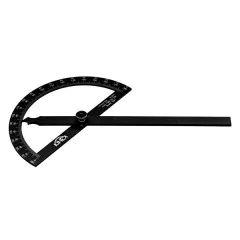


Angle tracing gauge 120/200 180 degrees Inox Kinex
€30.75 tax inc.
Last items in stock
Instant Shipping


This website uses its own and third-party cookies to improve our services and show you advertising related to your preferences by analyzing your browsing habits. To give your consent to its use, press the Accept button.
Cookie preferences
Functional cookiesTechnical
Functional cookies are strictly necessary to provide the services of the shop, as well as for its proper functioning, so it is not possible to refuse their use. They allow the user to browse through our website and use the different options or services that exist on it.
Advertising Cookies
These are cookies that collect information about the advertisements shown to users of the website. They can be anonymous, if they only collect information about the advertising spaces shown without identifying the user, or personalised, if they collect personal information about the user of the shop by a third party, for the personalisation of these advertising spaces.
Analytics cookies
Collect information about the user's browsing experience in the shop, usually anonymously, although sometimes they also allow the user to be uniquely and unequivocally identified in order to obtain reports on the user's interests in the products or services offered by the shop.